AWS Cloud Formation doing crazy
Date: 27 November 2025

Intro
I decided to write this article after a year and a half of actively using AWS CloudFormation across two separate products. Because it’s less popular than Terraform, finding solutions to some problems often meant piecing together hints from different sources. Here I’ll share my experience in the hope that it helps someone else solve their CloudFormation challenges.
A large part of this article is code. It’s mainly a note for myself in the future, so I can remember how I used AWS CloudFormation if I need to work with it again.
When you work with CloudFormation, there are some key differences from Terraform. For example: there’s no automatic drift remediation, deployments are all-or-nothing (no partial apply), you can’t deploy to multiple regions in one go, and stack policies have their own quirks you need to understand.
Below I will show how to overcome these challenges to deploy this example architecture. Code is available on github.
CloudFormation Demo Stack for this Article
Purpose:
End-to-end AWS reference environment that bootstraps networking, security, compute, data, and edge delivery through layered CloudFormation templates orchestrated by cfn-stacks/10-main-stack.yaml.
GitHub repository:
https://github.com/andygolubev/article-cfn-pain-points

High resolution image is here
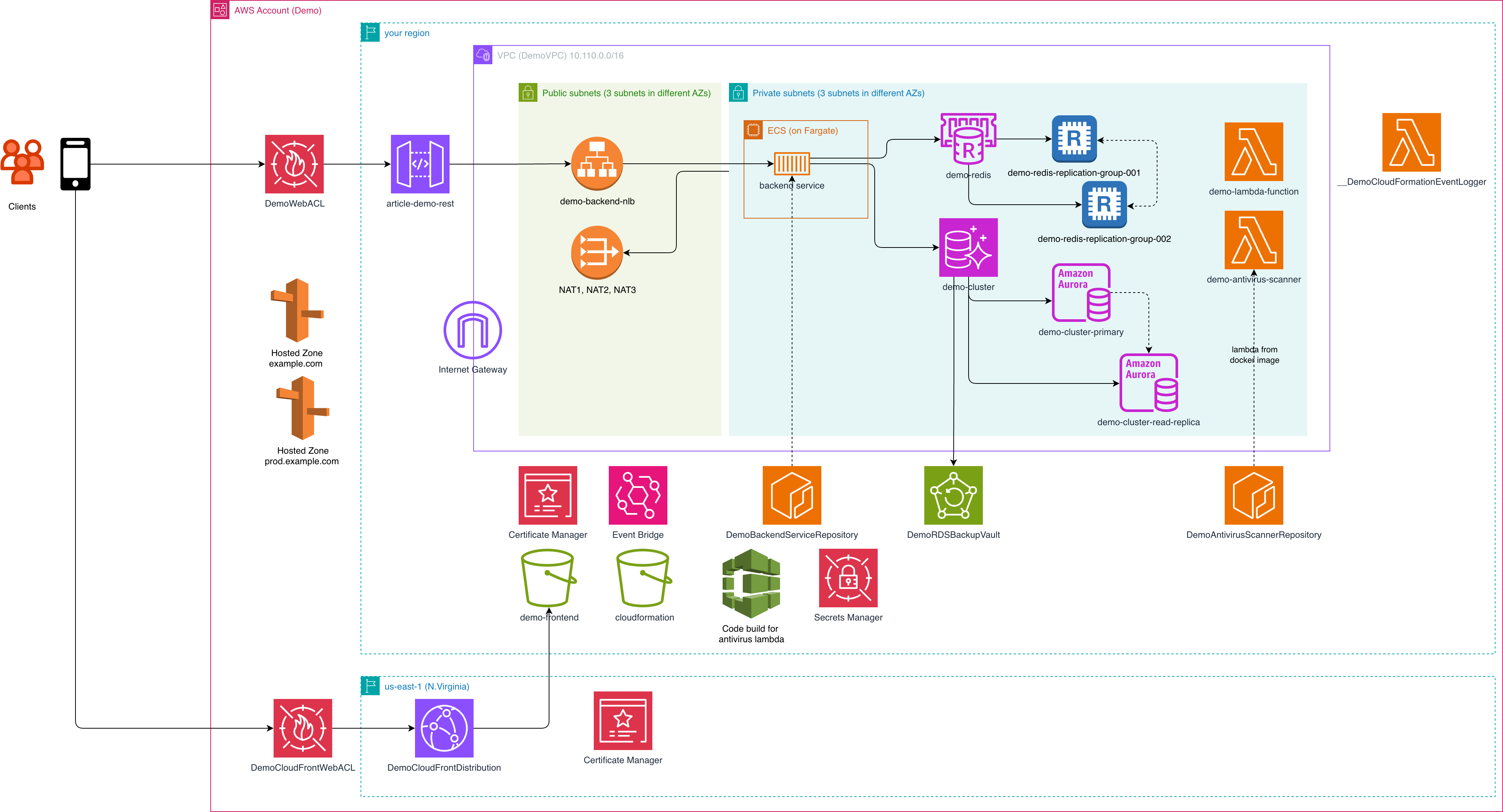
CloudFormation blueprints (cfn-stacks/):
Modular stacks for shared artifacts and ECR registries, VPC and NAT topology, Route 53 hosted zone, Aurora/PostgreSQL, ElastiCache Redis, Fargate-based ECS, API Gateway fronting the internal NLB, EventBridge wiring, WAF protection, Lambda resources, and a us-east-1 global stack providing ACM/CloudFront distribution with DNS aliases. Parameter sets live in parameters-.json, while main-stack-policy.json locks down updates in stage/prod.
Lambda layer (lambda-layer/):
Dockerfile-driven build that packages shared Python helpers like common_service.get_hello_world() into a reusable layer zip (lambda_layer.zip) for multiple functions; build commands are documented in the folder README.
Lambda functions (lambda-functions/ | demo_lambda/):
Sample Python handler that imports the shared layer artifact to return a greeting and request metadata, demonstrating code reuse across functions.
ECS service (ecr-repo-services/):
Two example workloads with ready-to-push Dockerfiles—demo-backend-service (Go HTTP service for ECS Fargate) and demo-antivirus-scanner (Python ARM64 Lambda image)—each with snippets for authenticating to ECR, creating repositories, and pushing images.
Frontend sample (cloudfront-frontend-code/):
Minimal static site that represents the S3-hosted SPA/front-end assets later served through CloudFront.
Automation scripts (scripts/):
01-deploy-cfn.sh orchestrates regional stack deployments, parameter wiring, and layer uploads; 02-deploy-cfn-global.sh handles the us-east-1 global stack, reading outputs from the regional deployment.
The codebase is deployable and operational; I’ve verified it in my AWS account =)
Deploying to Multiple Regions
CloudFormation wasn’t really designed for comfortable multi-region deployments. I don’t know why. But there are workarounds.
Here’s what I’ve used:
- A Bash wrapper that deploys different resources to different regions and passes parameters between them.
- StackSets to push the needed resources into another region, plus Secrets Manager replication to bring the final value back into the original region.
Example snippets:
WEGO_HOSTED_ZONE_ID=$(aws cloudformation list-exports --region $REGION | jq -r ".Exports[] | select(.Name == \"demo-hosted-zone-id\") | .Value")

WEGO_HOSTED_ZONE_DOMAIN=$(aws cloudformation list-exports --region $REGION | jq -r ".Exports[] | select(.Name == \"demo-hosted-zone-domain-name\") | .Value")

DEMO_CLOUDFRONT_CERTIFICATE_DOMAIN_NAME=$(jq -r '.[] | select(.ParameterKey == "DemoCloudFrontCertificateDomainNameParam") | .ParameterValue' "parameters-$4.json")

S3_DEMO_BUCKET_NAME=$(aws cloudformation describe-stacks --stack-name demo-s3-stack --region $REGION --query "Stacks[0].Outputs[?OutputKey=='DemoFrontendBucketName'].OutputValue" --output text)

S3_DEMO_BUCKET_OAI=$(aws cloudformation describe-stacks --stack-name demo-s3-stack  --region $REGION --query "Stacks[0].Outputs[?OutputKey=='DemoFrontendCloudFrontOAI'].OutputValue" --output text)
When you use StackSets, you need to add a few roles and some shared plumbing (the StackSet itself). The final template for the deployment has to be embedded inside the StackSet. It’s not pretty—linters won’t parse this setup—but for one-off cases it’s good enough.
Deploying big stacks
To pass parameters between stacks you have a few options:
- Nested stacks
- Exports and imports
At first glance, exports/imports look cleaner. In practice, they can lock you in. Once you export a value and other stacks start importing it, you can’t change that value freely. To update it, you have to touch every stack that consumes the export. The good news: it’s easy to see which stacks are using your export.
Because of this, I usually prefer nested stacks with parameter passing. When the root stack changes, CloudFormation updates all dependent resources automatically—either by applying changes or recreating what’s needed. It keeps the dependency chain explicit and the updates predictable.
Applying stack policy to nested stacks
When you apply a stack policy to the root stack, it doesn’t automatically cover the nested stacks. Each nested stack is its own stack with its own policy. Because of that, I set the policy separately for every nested stack—usually in a small loop/script that iterates over child stacks and applies the policy to each one.
NESTED_STACK_ARNS=$(aws cloudformation describe-stack-resources --stack-name demo-main-stack  --region $REGION --query "StackResources[?ResourceType=='AWS::CloudFormation::Stack'].PhysicalResourceId" --output text)

echo "Setting stack policy for demo main stack: demo-main-stack"
aws cloudformation set-stack-policy --stack-name demo-main-stack --stack-policy-body file://main-stack-policy.json --region $REGION
if [ $? -ne 0 ]; then
echo "Error setting stack policy to demo main stack. Exiting..."
exit 1
fi

# Apply stack policy to each nested stack
for STACK in $NESTED_STACK_ARNS; do
    echo "Setting stack policy for nested stack: $STACK"
    aws cloudformation set-stack-policy --stack-name $STACK --stack-policy-body file://./main-stack-policy.json --region $REGION
    if [ $? -ne 0 ]; then
    echo "Error setting stack policy to nested stack: $STACK. Exiting..."
    exit 1
    fi
done

for STACK in $NESTED_STACK_ARNS; do
    echo "Get stack policy for nested stack: $STACK"
    aws cloudformation get-stack-policy --stack-name $STACK --region $REGION --output json --no-cli-pager | jq '.StackPolicyBody | fromjson'
    if [ $? -ne 0 ]; then
    echo "Error getting stack policy from nested stack: $STACK. Exiting..."
    exit 1
    fi
done
How to deploy this stack
You can deploy this stack with aws cli tool. You also need jq to be installed.
It uses different parameters-env.json in cfn-stacks/ folder for each environment.
Example:
./scripts/01-deploy-cfn.sh --region eu-central-1 --env dev
./scripts/02-deploy-cfn-global.sh --region eu-central-1 --env dev
Conclusion
You don’t always need to rely on out-of-the-box solutions, especially when they don’t fit your needs. With a bit of creativity and the right open-source tools, you can build a custom solution that’s both effective and cost-efficient. In this case, combining Prometheus, Grafana, Loki, and a few other tools, I managed to set up a reliable monitoring system that works perfectly for a small startup without breaking the bank.
I hope you enjoyed this article.
You can find all of my code in my GitHub repository: https://github.com/andygolubev/article-cfn-pain-points
Feel free to connect with me on LinkedIn: https://www.linkedin.com/in/andy-golubev/